
Reports, transcripts, summaries
A call report is the full record of one bot conversation with a customer. Open it from Call history via Full report → or from the order detail panel. Below: what it contains and how to read it.
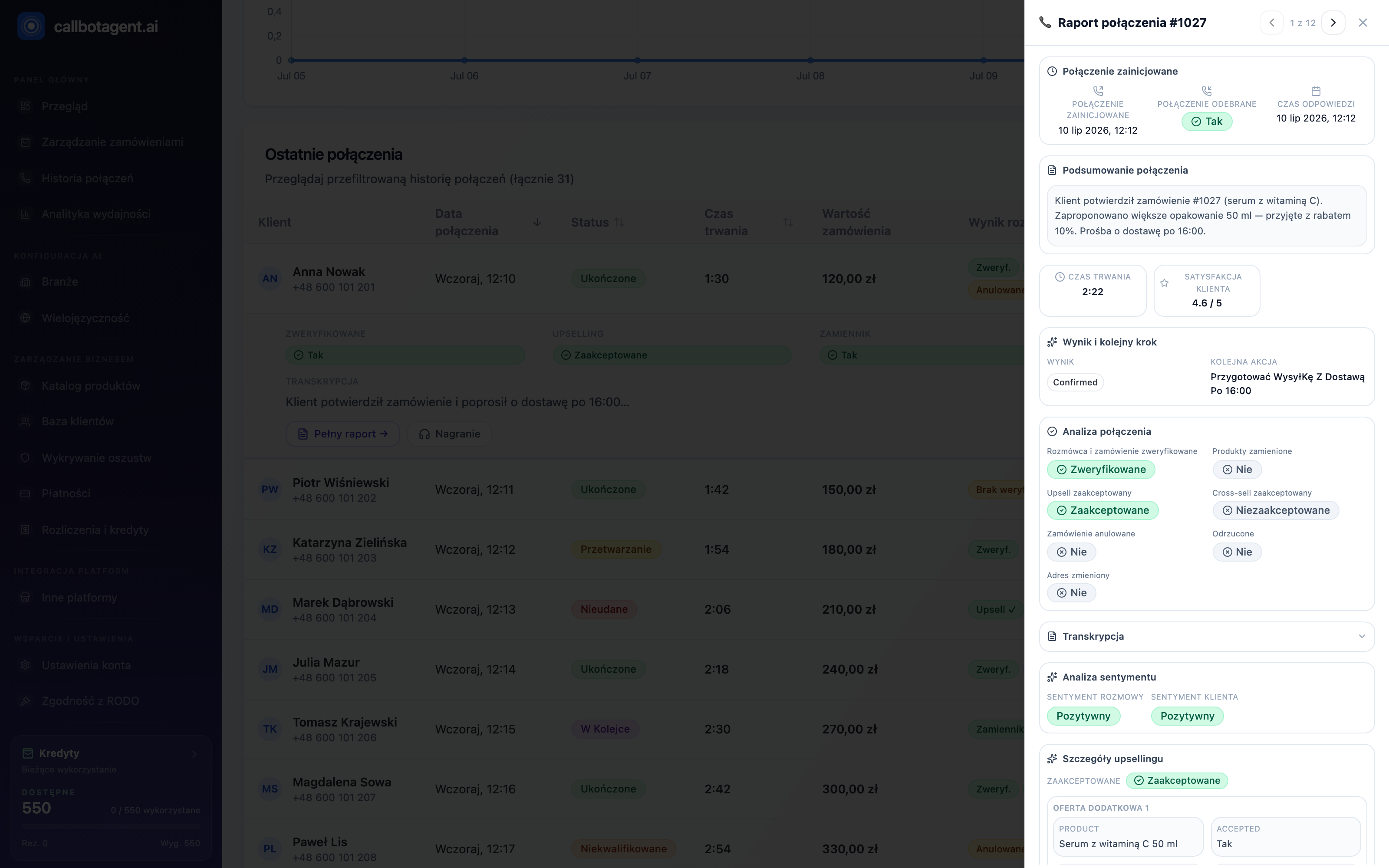 Report opens as a right-side panel you scroll down: summary, customer satisfaction, call analysis, sentiment, transcript, and upsell details. Sample data (demo).
The report panel opens on the right and scrolls. At the top you see the call number and arrows to previous/next items so you can browse calls without returning to the list.
What is in the report
| Section | What it shows |
|---|---|
| Call flow | When initiated, whether customer answered, and at what time |
| Conversation summary | Short paragraph — fastest way to see what was agreed |
| Metrics | Duration and — when available — customer satisfaction score out of 5 |
| Outcome and next step | Call outcome and suggested follow-up |
| Conversation analysis | Customer decisions as Yes / No tags (see below) |
| Transcript | Full text record when saved |
| Sentiment analysis | Sentiment for conversation and customer separately |
| Verification data | Information confirmed by the customer during the call |
Customer decision — "Conversation analysis"
The most important part. Each item shows how the customer responded to the order and bot proposals:
- Confirmed — customer confirmed the order unchanged.
- Address change — customer gave a new shipping or billing address; new data appears in a dedicated section.
- Replacement — instead of unavailable item customer accepted a substitute proposed by the bot.
- Upsell / cross-sell — customer accepted a larger pack or add-on; offer details expand below.
- Declined — customer rejected order or proposal.
- Cancelled — order was cancelled; reason appears in "Cancellation" when provided.
Yes / No / "—" tags describe only this one call. "—" means that topic was not reached (e.g. bot did not go there), not that the customer said no.
Transcript and sentiment
The transcript records what was said — useful when the summary is not enough and you need exact wording. Sentiment rates tone separately for the whole call and the customer, on Positive / Neutral / Negative. Negative sentiment with a confirmed order is a signal to read the transcript.
Our voice engine runs the conversation. Summary, sentiment, and transcript are generated automatically from the call — use them as decision support, not as a formal customer statement.
How to read a report in practice
- Start with Summary — context in seconds.
- Check Conversation analysis — confirmed, changed, or declined.
- For upsell or replacement expand offer details.
- If unsure, open Transcript and compare with sentiment.