
Fraud protection
Order protection helps you spot suspicious orders before they cause trouble — for example rejections and cancellations with elevated risk. It is a review tool: it shows signals and context, and you decide in the systems you already use.
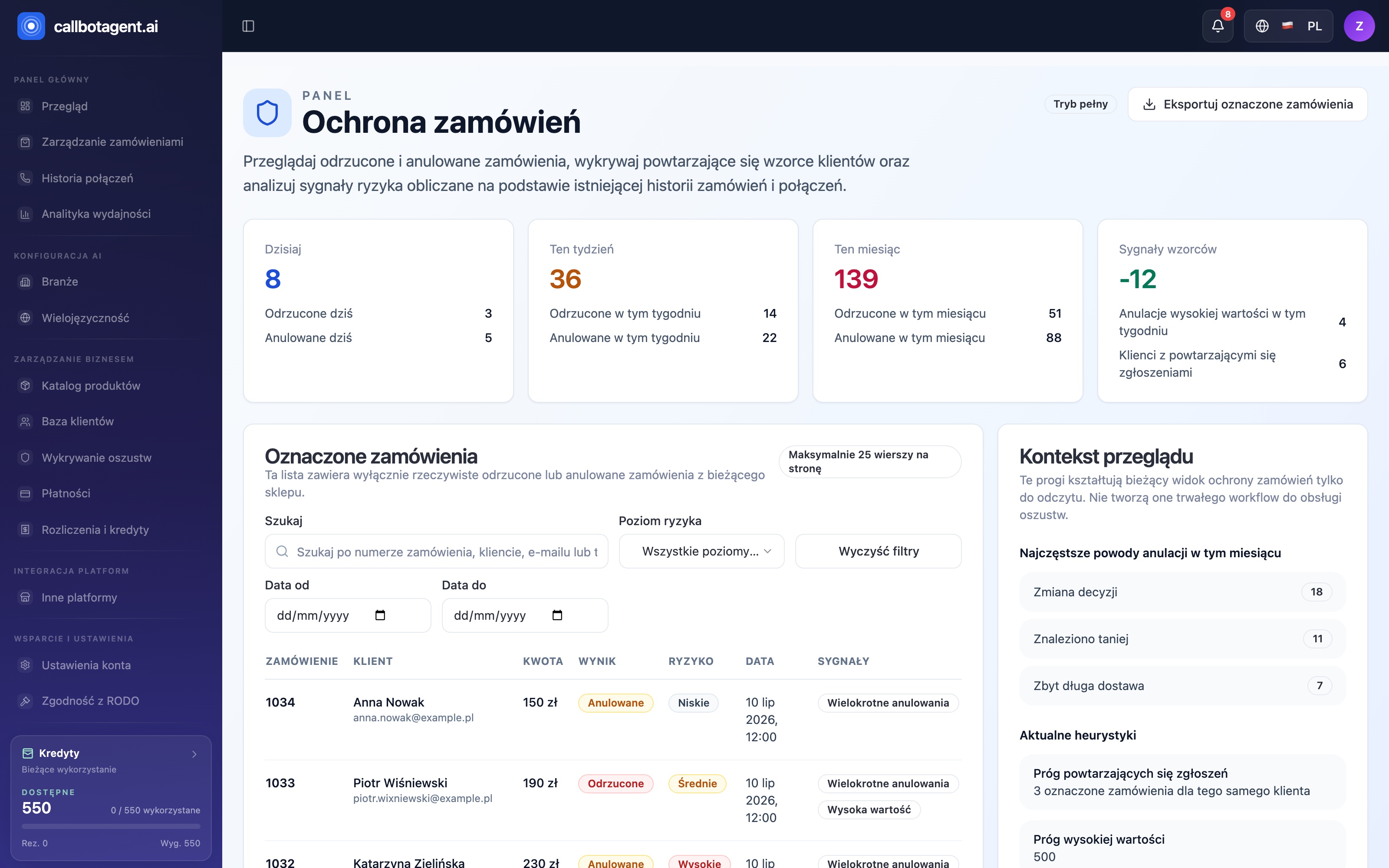 Order protection module (fraud detection). Sample data (demo).
What protection does
Protection gathers in one place data you already have — about orders, customers, and calls — and flags orders worth checking. It does not block anything automatically or act on your behalf; it draws attention to what diverges from normal.
Overview dashboard
Four tiles at the top summarize scale. Each shows total flagged orders and split into rejected and cancelled:
| Tile | What it shows |
|---|---|
| Today | flagged orders today, rejected vs cancelled |
| This week | same numbers weekly |
| This month | same numbers monthly |
| Pattern signals | week-over-week change plus signals: high-value cancellations and customers with repeat flags |
Tiles are a quick health check — no action required; they help judge whether unusual order volume is off norm in a period.
Flagged orders list
The Flagged orders table contains only real rejected or cancelled orders from your store (max 25 rows per page). Each row is one case:
| Column | What it shows |
|---|---|
| Order | order number |
| Customer | name and email |
| Amount | order value |
| Outcome | Cancelled or Rejected |
| Risk | level: Low, Medium, or High |
| Date | order date and time |
| Signals | flag reasons, e.g. Multiple cancellations, High value |
Above the table, tools to narrow the view:
| Capability | Description |
|---|---|
| Filtering | by risk level and date range (From / To) |
| Search | by order number, customer, email, or phone |
| Clear filters | restore full list |
| Export | Export flagged orders saves current view to CSV |
Risk signals
Flagged orders show signals computed from your data suggesting why review is worthwhile:
- address mismatch,
- high-value order context,
- cancellation reason, payment status, and order creation time.
Signals are hints for manual review — not verdicts. Final assessment is always yours with full context.
Review context panel
Beside the list, Review context explains where flags come from:
- Most common cancellation reasons this month — e.g. Changed mind, Found cheaper, Delivery too long, with counts.
- Current heuristics — thresholds for listing orders: repeat flag threshold (e.g. 3 flagged orders for same customer) and high value threshold (e.g. 500).
Thresholds are read-only — they shape the current view but do not create a persistent fraud workflow or trigger actions. This is risk signal analysis, not an accusation against the customer.
Customer profiles
For a suspicious order you can view customer history in the store: prior rejections and cancellations, order frequency, and average basket value. That helps separate one-off cases from repeating patterns.
Order protection is read-only — signals and context for review. It does not open cases or block customers for you; those decisions stay on your side.